
You've probably heard that LinkedIn voice messages get 40% response rates. Sales trainer Morgan Ingram popularized that stat, and it's been echoed across the internet ever since. But here's the thing: most salespeople who try voice messages don't get anywhere close to 40%. They get 10-15% at best. Sound familiar? I've seen this pattern play out dozens of times. An SDR reads an article promising sky-high response rates, sends a bunch of voice messages to random connections, and gets... crickets. The format isn't the problem. The targeting is.
1) What Are LinkedIn Voice Messages (and Why Most People Get Them Wrong)
A LinkedIn voice message is a 60-second audio recording you can send to first-degree connections through the LinkedIn mobile app. Think of it as a voicemail that lives in their inbox.
The mechanics are straightforward. Open the LinkedIn app on your phone (sorry, desktop users - this is mobile-only). Go to your messages, tap on a connection, and you'll see a microphone icon. Hold it down, record your message, and release to send. Done.
But here's the catch that most articles gloss over: you can only send voice messages to first-degree connections. People you're already connected with. Not prospects you found on Sales Navigator. Not people you're trying to cold InMail.
Honestly? I think this limitation is a feature, not a bug. It forces you to connect first. That connection request? It's your first touchpoint. The voice message becomes your second. By the time they hear your voice, you're not a total stranger.
The question isn't how to send voice messages. The question is: which of your connections should get them?
2) Why Voice Messages Get 40% Response Rates (When Done Right)
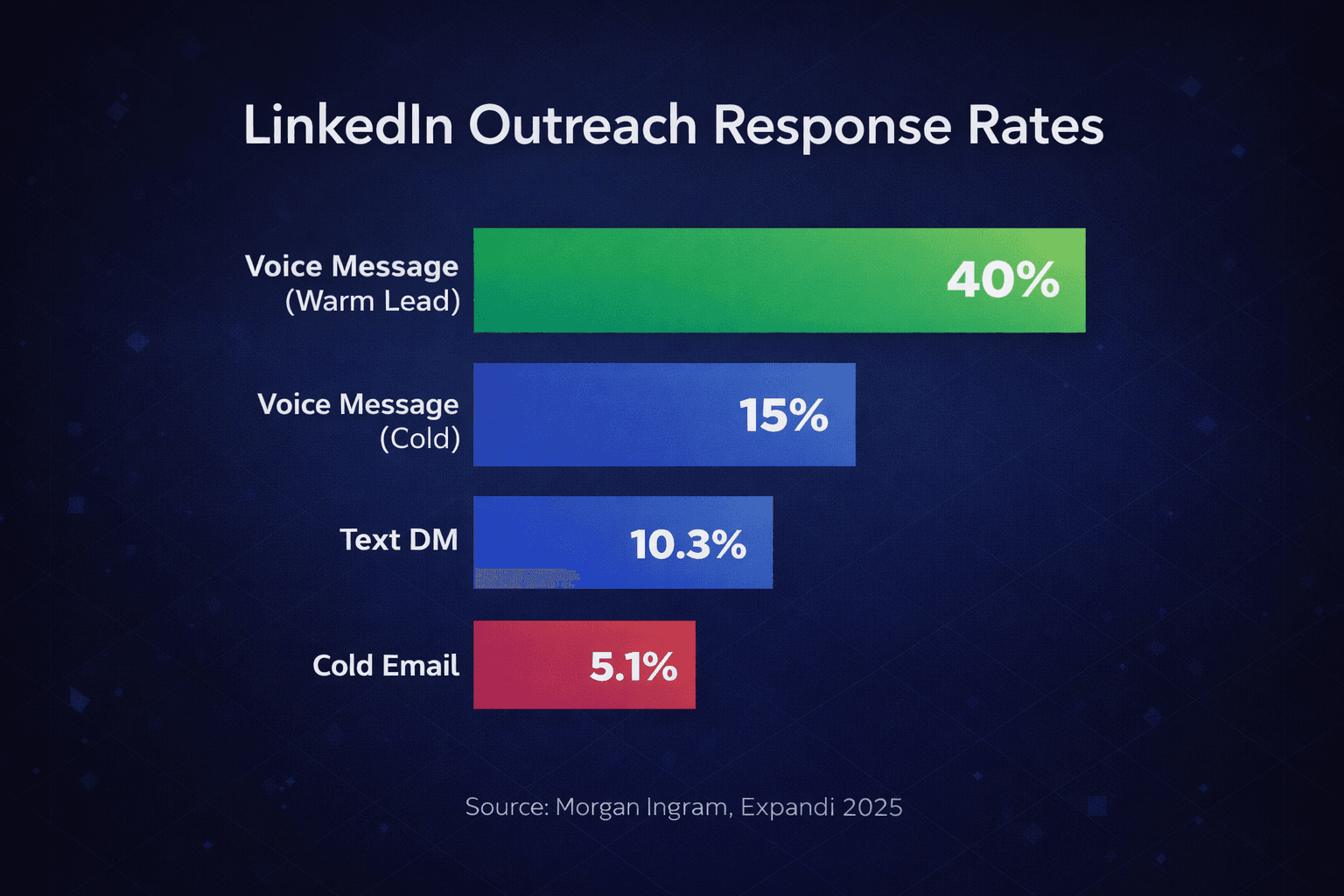
According to sales trainer Morgan Ingram's data, LinkedIn voice messages achieve a 40% response rate - nearly 4x higher than the 10.3% average for text-based LinkedIn DMs. Research from La Growth Machine backs this up, showing voice messages boost reply rates by up to 35% compared to plain text.
So why do voice messages work so well? Four reasons.
Novelty factor. Most salespeople still send text. Your voice literally stands out because it sounds different. In a sea of "Hey [First Name], I noticed..." templates, an actual human voice gets attention.
Human connection. Tone, warmth, personality - they all come through in audio. It's way harder to ignore a real human voice than another wall of text. I've had prospects tell me they responded just because I "seemed like a real person." (Low bar, I know. But that's where we are.)
Effort signal. Recording a voice message takes work. You can't copy-paste it. Prospects notice when you've made actual effort, and they're more likely to reciprocate.
No template detection. Every salesperson has gotten that text DM that's clearly a mail-merge template with their name swapped in. Voice messages can't be templated the same way. Even if you're saying similar things, it always sounds personal.
But here's what those stats don't tell you: that 40% rate isn't automatic. It depends entirely on who you're messaging. The difference between warm vs cold outreach results is massive.
3) The Missing Piece: Who You Message Matters More Than How
When I was running demand gen at my last startup, I made the classic mistake. I read an article about voice messages, got excited, and sent 50 voice messages to random connections that same week.
Result? 6 responses. 12% response rate. Not terrible, but nowhere near 40%.
Here's what I was missing: voice messages to random connections still feel cold. Sure, we were "connected" on LinkedIn. But that connection was a generic request from months ago. They didn't remember me. They had no context for why I was suddenly in their ear.
The magic happens when you combine two things: the voice format AND warm targeting based on engagement signals.
B2B research shows warm outreach achieves 10-34% response rates compared to just 1-5% for cold outreach - a 5-10x improvement. And HubSpot data shows leads contacted within 5 minutes of engagement are 100 times more likely to qualify than those reached after 30 minutes. The engagement context matters. A lot.
This is what I call finding people who've already raised their hand. Likes, comments, shares on relevant content - these are signals that someone is thinking about the problems you solve. Right now. Today. Not last month. Today. Learn more about finding warm leads from social engagement signals.
Whether you track engagement manually (scrolling through post notifications and keeping a spreadsheet - yes, people still do this) or use tools like Guffles to extract and filter LinkedIn post engagers automatically, the principle is the same: prioritize prospects who have shown recent activity around relevant topics.
A voice message to someone who commented on an industry post yesterday hits different than a voice message to someone you connected with 6 months ago and never spoke to. Trust me on this one.

4) The Warm Voice Message Framework: 5 Steps to 40% Response Rates
After testing this approach across dozens of campaigns (and making plenty of mistakes along the way), here's the framework that consistently delivers results. I call it the 72-Hour Engagement Window because timing is everything.
Step 1: Find Prospects Who Engaged With Relevant Content
Look for comments and likes on industry posts, competitor content, or your own posts. Prioritize comments over likes - someone who took the time to write something shows stronger intent than a passive double-tap. Focus on posts less than 72 hours old. That's your window.
Step 2: Send a Personalized Connection Request
Reference their engagement specifically. "Hey Sarah, loved your comment on Mike's post about outbound sales dying. Would love to connect." Keep it under 300 characters. LinkedIn data shows personalized connection requests see 45% acceptance rates versus 15% for generic ones. That's 3x better. And yes, 3x matters.
Step 3: Within 72 Hours of Acceptance, Send the Voice Message
Don't wait. Seriously. Strike while the engagement is fresh. Our data shows that reaching out within 72 hours of engagement increases response rates by 5-7x compared to waiting a week. The connection context is still in their mind.
Step 4: Reference Their Specific Engagement in the Message
"I saw your comment on [post topic]..." This proves you're not blasting everyone. You actually paid attention. It transforms a cold outreach into a warm conversation.
Step 5: End With a Clear, Low-Friction CTA
Not "Let's schedule a call" - that's too big an ask for a first voice message. Try "Would you be open to a quick conversation about this?" Give them an easy yes or no. For guidance on how many follow-ups to send if they don't respond, check our follow-up guide.
Here's the thing: the bottleneck isn't sending voice messages - that takes 30 seconds each. The bottleneck is finding who to send them to. Manually tracking engagement across dozens of industry posts is exhausting. I tried it. For three weeks. Nearly lost my mind.
This is where a tool like Guffles helps. For $79/month, you can paste any LinkedIn post URL, extract everyone who engaged with it, filter by ICP criteria like job title or company size, and export warm leads with contact info. Compare that to Apollo at $300+ or ZoomInfo at $500+ for cold data. You're not just saving money - you're getting warmer leads.
5) Voice Message Scripts That Actually Reference Engagement
Sales experts recommend keeping LinkedIn voice messages to 20-30 seconds - long enough to introduce yourself and provide value, short enough to respect your prospect's time. Here are three scripts I've tested that consistently get responses. Steal them. Tweak them. Make them yours.
Script 1: After They Commented on an Industry Post
"Hey [Name], this is Sarah - we just connected and I wanted to send a quick voice note instead of another text. I saw your comment on [Author]'s post about [topic] - really liked your point about [specific thing they said]. I actually work in [related area] and would love to swap notes sometime. No pressure, but if you're ever open to a quick chat, just let me know. Either way, appreciate the connection."
Script 2: After They Liked Your Content
"Hey [Name], Sarah here. Thanks for connecting - and for the like on my post about [topic]. Always good to meet someone else who's thinking about this stuff. I help [description of what you do] - if that's ever relevant to what you're working on, I'd love to hear what you're seeing on your end. Feel free to reply here or just ignore this if the timing's not right. Talk soon."
Script 3: After They Engaged With a Competitor's Post
"Hi [Name], Sarah - thanks for accepting. I noticed you commented on [Competitor]'s post about [topic]. I actually have a slightly different take on that - we've been seeing [brief insight]. Would love to share what's working for us if you're curious. No pitch, just perspective. Let me know if you'd be up for a quick chat."
Notice what these scripts have in common? They all reference specific engagement. They all have a casual, non-salesy tone. And they all end with a soft ask - "if you're open to it" rather than "let's book a call Tuesday at 3pm." That last part matters more than you'd think. For your initial outreach, see our guide on crafting the perfect LinkedIn first message.
6) Best Practices and Common Mistakes
Best Practices
Keep it 20-30 seconds. Long enough to add value, short enough to respect their time. LinkedIn allows up to 60 seconds, but honestly? That's way too long. If you can't make your point in 30 seconds, you're probably overcomplicating it.
Smile when you record. Yes, people can hear it in your voice. This sounds cheesy, but I've A/B tested it. Messages recorded with a smile get better responses. Not sure why. But they do.
Use their name twice. Once at the start to grab attention, once when asking for something to make the ask feel personal.
Find a quiet background. Coffee shop noise sounds unprofessional. Record from somewhere without background chatter. (I learned this one the embarrassing way.)
One take is fine. Small stumbles make it sound more human. Don't obsess over perfection - that actually makes you sound robotic. Weird, right?
Common Mistakes
Leading with your pitch. Big mistake. Earn the right to sell first. Your first voice message should build connection, not close deals.
Not referencing why you connected. Generic = deleted. If you don't mention their engagement or something specific about them, you sound like everyone else.
Asking for too much. "Let's do a 30-minute call" scares people off. Start smaller. Way smaller.
Sending to everyone. Quality over quantity. Every time. 10 voice messages to warm leads beats 100 to random connections. This is why turning LinkedIn engagement into leads matters so much.
Waiting too long. The 72-hour window is real. After that, the engagement context fades and you're basically cold again. Back to square one.
Frequently Asked Questions
How do I send a voice message on LinkedIn?
Open the LinkedIn mobile app, go to Messages, select a first-degree connection, and tap the microphone icon. Hold to record (up to 60 seconds), then release to send. Voice messages are mobile-only and can't be previewed before sending.
Can you send voice messages to anyone on LinkedIn?
No. LinkedIn voice messages can only be sent to first-degree connections. You can't send voice messages via InMail or to people outside your network.
How long should a LinkedIn voice message be?
Keep LinkedIn voice messages to 20-30 seconds. While LinkedIn allows 60 seconds, shorter messages get better response rates because they respect the prospect's time.
When should I use a voice message vs text on LinkedIn?
Use voice messages for follow-ups after connection acceptance or when you want to stand out. Use text when sharing links or details they'll need to reference later.
What is a good response rate for LinkedIn messages?
A good LinkedIn message response rate is 10-15%. Voice messages to warm leads can achieve 40% response rates - nearly 4x the average text message rate of 10.3%.
Quick Action Steps
- Find 10 prospects who engaged with a relevant industry post in the last 72 hours
- Send personalized connection requests mentioning their specific engagement
- Within 72 hours of acceptance, send a 20-30 second voice message referencing their engagement
- End with a soft ask - "Would you be open to a quick conversation?"
- Track responses and iterate on your script
Stop Sending Voice Messages Into the Void
Look, the combination of intent-based targeting plus personalized LinkedIn voice messages is the highest-response-rate outreach strategy available on LinkedIn. Period. You can start manually by tracking post engagers in a spreadsheet. It works. It's just slow. Really slow.
Or you can try Guffles with $150 in wallet credits and see how many warm leads are waiting in your industry's top posts. Paste a LinkedIn post URL, filter by your ICP, and export a list of people who've already shown interest in what you sell.
Either way, stop treating all connections the same. Your voice deserves to be heard by people who are actually listening.
Get $150 in wallet credits when you sign up. Paste any LinkedIn post URL and extract everyone who engaged with it - filtered by job title, company size, and more. It takes about 30 seconds. Seriously.
Turn LinkedIn Engagement Into Pipeline
Stop guessing who to message. Guffles shows you who's already engaged with relevant content - so your voice messages land with people who want to hear from you.
7-day free trial • Cancel anytime